SoloDesks · Websites & customer management

Your work deserves a better website.
And a simpler follow-up.

Website building and customer management setup for trade businesses. Show customers what you do, keep enquiries organised, and make the next step clear.

A website, help organising customers, or both. Work and price agreed before we start.

From enquiry to booked job

  1. 1

    Get found

    A website showing your services and recent work.

  2. 2

    Get the enquiry

    An easy way for a customer to tell you what they need.

  3. 3

    Keep track

    Customer details and the next action in one place.

  4. 4

    Follow through

    Follow up, prepare a quote and move the job forward.

We agree a setup that suits how you work.

See the work

Explore what we’ve built.

SoloDesks is our own working software. The trade website below is a demonstration of a possible project. Explore both to see the approach before you enquire.

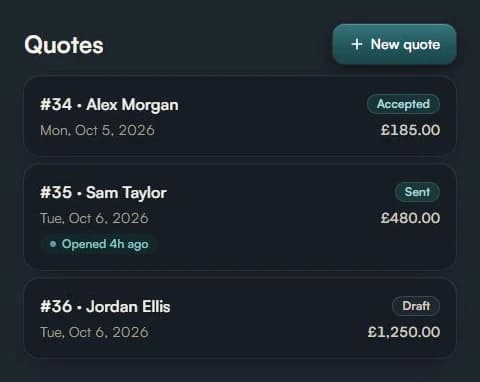
Actual SoloDesks quote management screen showing draft, sent and accepted quotes with demonstration data.

Our own product · Working software

SoloDesks

We built the app behind this site: customer records, quotes, invoices and job scheduling for solo tradespeople. This is a real product screen using demonstration customer data.

What it shows: status tracking, clear customer actions and practical screens for everyday work.

Explore the product →

Trade website demonstration

Local plumbing.
A clear next step.

Services, areas covered and an easy way for customers to ask about a job.

Open the demo ↗

Concept project · Fictional business

A trade website example

A working example page showing how a trade business can present its services and help customers get in touch. It is a demo, with no real business, customer reviews or performance claims.

What it shows: services and areas covered, a layout that works on a phone, and a clear way to ask about a job.

Explore the website demo →

One job. Less paperwork.

A 32-second animated product story with an original soundtrack. See a quote accepted, the job added to the calendar and an invoice prepared, followed by a payment link and reminders. Illustrated with demonstration data. Payment links and automatic reminders are Pro features.

Prefer to read? View the product features and screenshots.

Start with the part you need.

01

A website that explains your work

Give customers a clear place to see what you do, where you work and how to get in touch.

  • Pages for your services and coverage area
  • Easy to read and contact you from a phone
  • Your project photos, business details and branding
  • Search titles, descriptions and checks that search engines can access your pages
02

Keep customers and enquiries organised

Keep customer details, new enquiries and follow-up reminders together, so you know who to contact next.

  • See who needs a reply, a quote or a follow-up
  • Customer names, contact details and job notes
  • Reminders to follow up enquiries and quotes
  • Move agreed existing records across and learn how to use it
03

Keep website enquiries together

Make it easy for customers to describe their job, and for you to keep track of their enquiry.

  • Choose where new website enquiries arrive
  • Ask customers for the details you need to quote
  • Test the enquiry form before the website goes live
  • Simple instructions for using your website and customer records

Tell us what you need. We agree the work. You review it.

  1. Step 1

    Tell us what you need

    Share your trade, your current setup and the problems you want to solve.

  2. Step 2

    Agree the project

    We agree what is included, what it costs and when you can review it before work starts.

  3. Step 3

    Build and review

    Try the website and enquiry form, ask for agreed changes and learn how to use the finished setup.

Already looking for quotes, invoices and job management?

You can use the SoloDesks app without commissioning a project. See what the app does →

Let’s talk about your business

What would you like to build?

No technical knowledge needed. Tell us your trade, what you use now and what you want to make easier.

Prefer to email directly?
support@solodesks.com

This opens a draft in your email app. Review it and press send to contact us. These form details are not submitted to SoloDesks through this page.

Before you get in touch

How much does a project cost?

We quote after discussing what you need. You will know what is included, the price and the stages of the work before you agree. Any website address, hosting or customer software costs are explained separately.

Can I ask for just a website or help with customer records?

Yes. Choose either service or both. If you already have a website or customer system, tell us what you use and what you want to improve.

Is this included in SoloDesks Pro?

Website building and customer management setup are separate project services. The SoloDesks app has its own Free and Pro plans for quotes, invoices and job management.

What is a CRM, and do I need one?

A CRM is software for keeping customer details, enquiries and follow-ups together. We will discuss how you work and what you already use before recommending a setup. You can ask for a website on its own.

What happens after launch?

We show you how to use the finished setup and explain the support included in your quote. Any ongoing updates or maintenance are priced before you agree.